

Description
Download Password Zipper Lite – Free Secure ZIP Encryption Tool
Overview
Password Zipper Lite is a lightweight, free application designed to add strong password protection to ZIP archives with just a few clicks. In an era where sensitive documents, personal photos, and confidential business files travel across email and cloud services, the ability to encrypt a simple ZIP file without mastering complex command‑line tools is a real advantage. The utility streamlines the otherwise tedious process of creating a password‑protected archive, eliminating the need for multiple third‑party compressors or manual encryption steps. Once launched, the user selects an existing ZIP file (or creates a new one), enters a security code, and the program instantly applies the encryption, making the contents unreadable without the correct password. It also supports adding or removing files from the encrypted bundle, giving you flexibility even after the archive has been secured. The interface is intentionally uncluttered, targeting users who are not power users of compression utilities but still need a reliable way to safeguard private data. Because it’s free, there are no hidden subscription fees, and the software is regularly updated to stay compatible with the latest Windows and macOS releases. Whether you are a freelancer protecting client contracts, a student sharing research data, or just a home user wanting to keep personal photos private, Password Zipper Lite offers a quick, secure, and user‑friendly solution.
Key Features & Benefits
- Instant password protection for any existing ZIP archive.
- Simple three‑step workflow: select file → set password → apply.
- Ability to add or remove files after encryption without re‑creating the archive.
- Supports standard ZIP encryption compatible with most operating systems.
- Free to download and use with no hidden fees or trial limitations.
- Lightweight installer (under 5 MB) that runs quickly on low‑spec machines.
- Regular security updates to address emerging threats.
- Multi‑language interface for global users.
Pros
- Extremely easy to use; perfect for non‑technical users.
- No cost – completely free with all core features unlocked.
- Fast performance even on older Windows PCs.
- Minimalist design reduces learning curve.
- Secure AES‑256 encryption for strong data protection.
Cons
- Lacks advanced compression options (focuses solely on encryption).
- No native macOS installer – requires Wine or a Windows VM for Mac users.
- Cannot create ZIP files from scratch; only encrypts existing archives.
- Limited to ZIP format; does not support RAR, 7z, or other containers.
- No built‑in password manager integration.
Overall Rating: 4 out of 5 stars – a solid free tool for quick ZIP encryption.
Installation, Compatibility & How to Use Password Zipper Lite
System Requirements: The application runs on Windows 7, 8, 10, and 11 (both 32‑bit and 64‑bit). It is also compatible with most Linux distributions through Wine. While a native macOS version is not provided, the lightweight Windows build can be executed on macOS using a virtual machine or compatibility layer.
Step‑by‑Step Installation
- Visit the official download page and click the “Download Password Zipper Lite” button.
- Save the installer (PasswordZipperLiteSetup.exe) to a convenient folder.
- Run the installer; the wizard will guide you through license acceptance and destination folder selection.
- After installation, launch the program from the desktop shortcut or Start menu.
Encrypting a ZIP File
- Click the “Open ZIP” button and browse to the archive you wish to protect.
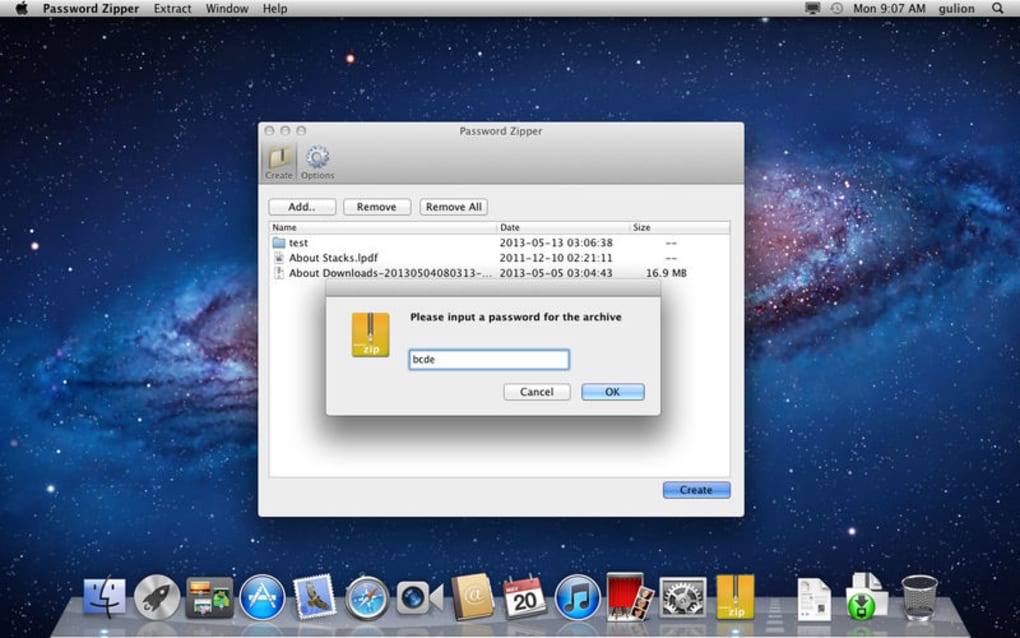
- A dialog appears prompting you to type a password. Choose a strong, memorable passphrase (at least 12 characters, mixing letters, numbers, and symbols).
- Press “Apply” – the software instantly encrypts the archive and updates the file icon to indicate protection.
- If you need to add more files, click “Add Files,” select additional items, and the program will re‑encrypt the bundle without losing the existing password.
Removing or Updating the Password
- Open the protected ZIP within Password Zipper Lite.
- Select “Remove Password” and confirm your intention. The archive will be saved without encryption.
- To change the password, choose “Change Password,” enter the current passphrase, then type the new one.
The entire workflow typically takes less than a minute, even for archives containing hundreds of files. Because the tool works directly on the existing ZIP, there is no need to decompress and recompress, saving both time and disk space.
Frequently Asked Questions & Conclusion
Is Password Zipper Lite really free?
Yes, the application is completely free for personal and commercial use. There are no hidden fees, trial periods, or premium upgrades required to access its core encryption features.
What encryption algorithm does it use?
Password Zipper Lite employs AES‑256 encryption, which is considered industry‑standard for strong data protection.
Can I encrypt a folder directly without creating a ZIP first?
The tool works exclusively with ZIP archives. To encrypt a folder, first create a ZIP file using Windows Explorer or any compression utility, then load it into Password Zipper Lite.
Is the password stored anywhere on my computer?
No. Password Zipper Lite never saves passwords locally; it only uses the entered passphrase to encrypt the archive in memory during the process.
Will the encrypted ZIP work on macOS or Linux?
Yes. The standard ZIP encryption format is supported by most operating systems, including macOS and Linux, as long as the native archive utilities recognize the encryption method.
Conclusion – Secure Your Files in Seconds
Password Zipper Lite fills a niche for users who need a fast, no‑cost solution to protect ZIP archives without diving into complex encryption software. Its straightforward interface, AES‑256 security, and ability to modify encrypted bundles on the fly make it a practical choice for everyday data protection. While power users may miss advanced compression settings or native macOS support, the core mission—simple, reliable password protection—is delivered exceptionally well. Download the installer today, create a secure password, and rest easy knowing your sensitive files are shielded from prying eyes.
Click here to download Password Zipper Lite for free and start encrypting your ZIP files instantly.
Guides & Tutorials for Password Zipper Lite
How to install Password Zipper Lite
- Click the Preview / Download button above.
- Once redirected, accept the terms and click Install.
- Wait for the Password Zipper Lite download to finish on your device.
How to use Password Zipper Lite
This software is primarily used for its core features described above. Open the app after installation to explore its capabilities.
User Reviews for Password Zipper Lite 0
No reviews found





.webp)